Environments
Store values such as base URLs, tokens, and IDs as variables, then reference them in any request. Switch environments to run the same requests against development, staging, or production.
.env files are available only in the paid version.Use Variables
Reference a variable with the {{variableName}} format.
{{variableName}}Works inQuery ParamsHeadersBodyTestsCommon Variables
The following variables are available for all requests without defining them in an environment.
| Variable | Value |
|---|---|
{{request_name}} | Name of the current request |
{{collection_name}} | Name of the collection the request belongs to |
{{folder_name}} | Name of the folder the request belongs to |
Environment Options
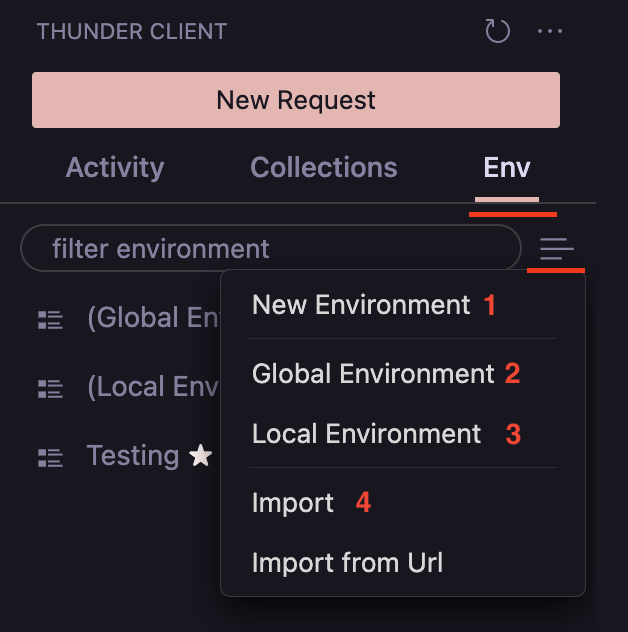
The numbered options in the image are referenced in the sections below.
Variable Precedence
When a variable is defined in more than one place, the value from the higher level wins. Levels are listed from lowest to highest precedence.
- OS Environment Variables
Reference OS environment variables as global variables using the format
{{variable}}. - Global EnvironmentPaid
Store variables that can be accessed across all collections. These values are saved in the
tc_env_global.jsonfile (option 2 in the image). - Local EnvironmentPaid
Save secrets and transient tokens locally on your computer, which is useful for excluding
secretsfrom a Git project. This environment is aglobaltype, and its variables are available to all collections (option 3 in the image). - .env FilesPaid
Link a
.envfile to an environment:- Create an environment (option 1 in the image).
- Open the Environment view and select
Link to .env file. - Select the
.envfile and save. You can now use its variables in requests with{{variable}}.
The variables in the
.envfile use this format:.env.samplekey=value name=thunder number=25543 - Active Environment
To use an environment’s variables, make it active from the options menu
...by selectingSet Active. See Active Environment. - Collection and Request Variables
Set
collection- andrequest-specific variables in scripting using therequestscope. These values are available only while the request runs. Open collection settings or the request view, then select thePre Runtab and use theScriptingtab.tc.setVar("name", "Thunder Client", "request"); tc.setVar("baseUrl", "http://localhost:8744", "request");